
Collect is threatER’s centralized SaaS solution to aggregate all of your threat intelligence. Collect provides customers access to best-in-class cyber intelligence feeds and threat lists, as well as the ability to create their own lists.
All List Types - Allow, Block, Threat - are consolidated into one table that is accessible by selecting Collect from the left-hand menu. The Lists tab is the default view, and you will also be able to access the Marketplace from within Collect as well.
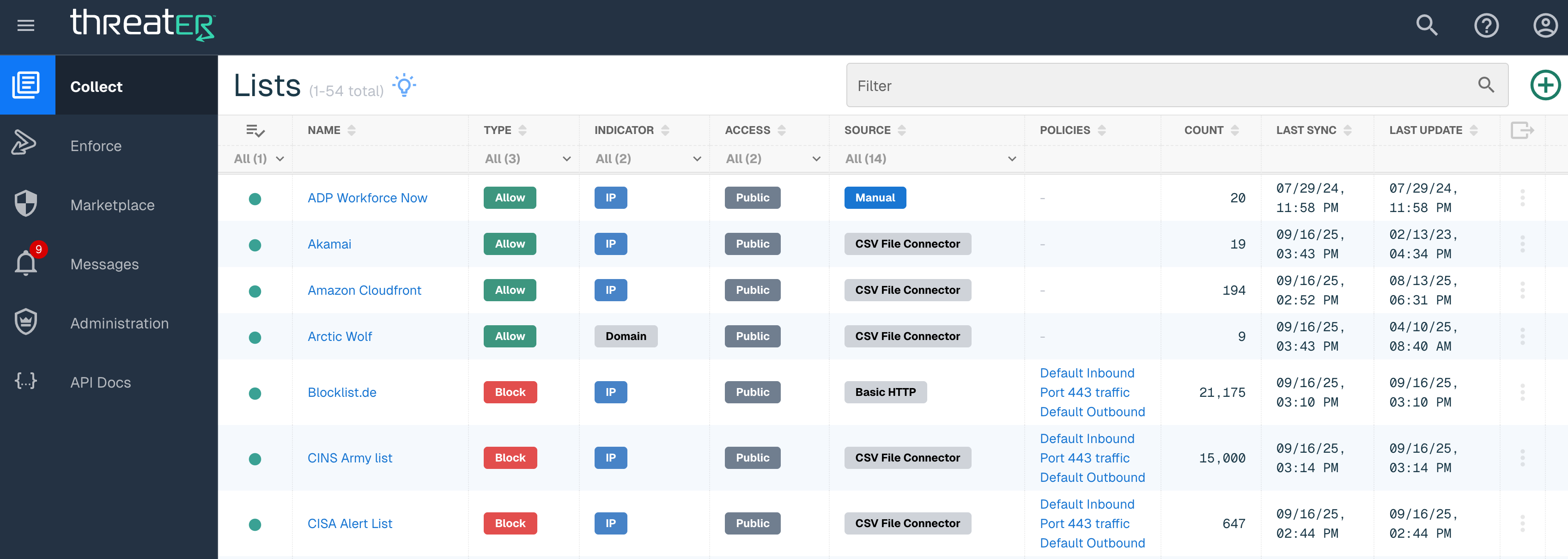
The table contains the following details on each column on the List table:
|
Field Name |
Available List Type |
Description |
|
Health State |
Allow, Block, Threat |
Options include Healthy and Needs Attention. A Green dot will display for a Healthy state. A Red dot indicates a Needs Attention state. When a list is in the Needs Attention state, the configuration of the list should be checked to ensure all settings are correct. A Yellow dot means there are currently no entires in the list. |
|
List Name |
Allow, Block, Threat |
Name of List |
|
Type |
Allow, Block, Threat |
Shares the type of list from the three options - Allow, Block, and Threat. |
|
Indicator |
Allow, Block, Threat |
Option includes IP or Domain contained in the list |
|
Access |
Allow, Block, Threat |
Options include Private and Public. Private indicates the List was created by the end user. Private Lists are editable and can be deleted by the end user. Public indicates the List that is threatER provided feeds (out-of-the-box) and can't be edited or deleted by the end user. |
|
Source |
Allow, Block, Threat |
Options include Manual or Source Name/Type. Manual will display for all Manual Lists created. The Source Name or Type (Basic HTTP, CSV File Connector, etc) will display for any plugin or integration. |
|
Policies |
Allow, Block, Threat |
The policies that have the list enabled |
|
Count |
Allow, Block, Threat |
Indicates the number of entries (IPs or Domains) in the List |
|
Last Sync |
Allow, Block, Threat |
The last time threatER Collect connected to the 3rd party system to check for updates to the list. Manual Lists will display the date the list was last edited. |
|
Last Update |
Allow, Block, Threat |
The last time the content of the list was modified |
Users can filter down the results in the Lists table by filtering based on Health State, Type, Indicator, Access, Source and text filter.
Allow Lists
Allow Lists can be used to ensure that trusted IPs and Domains are always allowed, through use with your threatER Enforce software or elsewhere in your security stack. When used with Enforce, IPs on an allow list will ensure connections are allowed even in the case where your Enforce policies would otherwise block the connection due to country, ASN, or the IP's inclusion on a threat or block list.

As threatER can handle up to 150 million unique threat indicators with 10-30 million indicators provided out-of-the-box, it is possible that users will run into outbound or inbound connections being blocked unexpectedly. Users can manage these blocked connections by configuring Allow Lists either utilizing manual lists or plugins. There are no limits to the amount of entries that can be included in lists.
IP and Domain Allow Lists are enabled on a per-policy basis.
Block Lists
Block Lists can be used to ensure that known-malicious IPs and Domains are blocked by threatER. Out-of-the-box partner block lists provided by threatER are refreshed at regular intervals. Depending on the rules enforced by the partner feed, the update interval can be anywhere from immediate, to every few minutes, to once per hour, and so on.

IP and Domain Block Lists are enabled on a per-policy basis.
Threat Lists
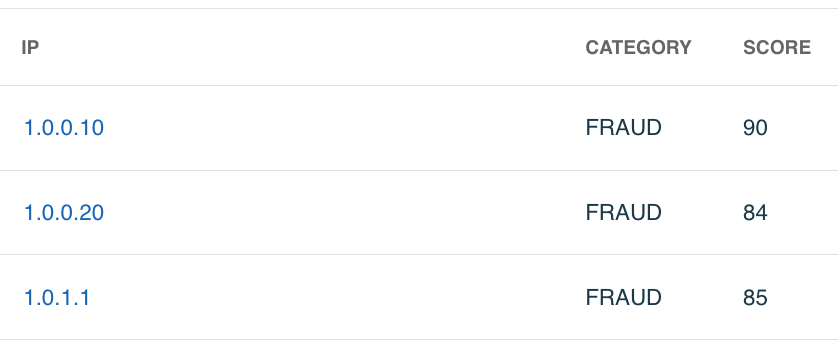
Threat Lists are provided by our partners Webroot (included with your threatER subscription) and Proofpoint (available in Intelligence Marketplace). These lists are composed of three pieces of information:
-
IP Address - the origin of the identified threat
-
Category - type of threat being identified
-
Score - a confidence score ranging from 1 to 100 where 1 is least likely to be a threat, and 100 is most likely to be a threat.
Threat Lists are used in Policy Risk Thresholds. Out-of-the-box Threat Lists are refreshed per terms of the partner feed, which is generally every few minutes.