
This document provides our best-practice suggestions for a robust high availability architecture when incorporating a threatER Enforcer into a layered security architecture, either in front of or behind a next-generation firewall and potentially other security controls.
Layered security is a complex topic, and extends well beyond network security controls, into software stacks, access considerations, data models, and more. For purposes of this document, we’ll focus on how the growing number of layered security elements placed in critical high availability paths are driving the need for more robust failover strategies. We define “layered security” in a network-driven high availability scenario as any high availability path that has two or more security controls in it. As more elements begin to be placed into high availability paths, for security purposes or for other purposes, it is imperative to ensure that you have a failover strategy in place that doesn’t limit the ability of your IT teams to quickly diagnose and remediate problems. That is, it is important to ensure that your failover strategy does not limit your ability to collect and act on all of the information available in at least near-real-time. Generally, this means that you need the ability to utilize any and all high-fidelity information available from each element in your high availability chain in independent fashion via standards-based APIs, correlate those pieces of information, and act on them. Thankfully, business tools exist to facilitate precisely that type of workflow: modern SIEMs.
A general depiction of a fairly standard Active / Active or Active / Passive path switching strategy for a layered network security architecture, managed by a SIEM of your choosing, would typically resemble:
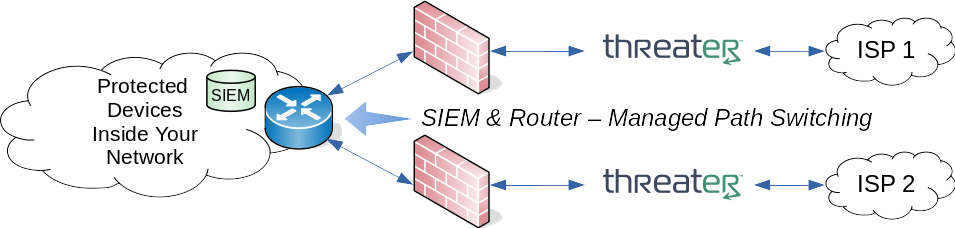
The drawing shows the threatER Enforcer sitting in front of your NGFW facing the ISP, but the same HA principles hold if you choose to deploy the threatER Enforcer behind the NGFW instead.
Hardware capable of dual bridging pairs can also be used for situations where two one gigabit links are used throughout the redundant paths:
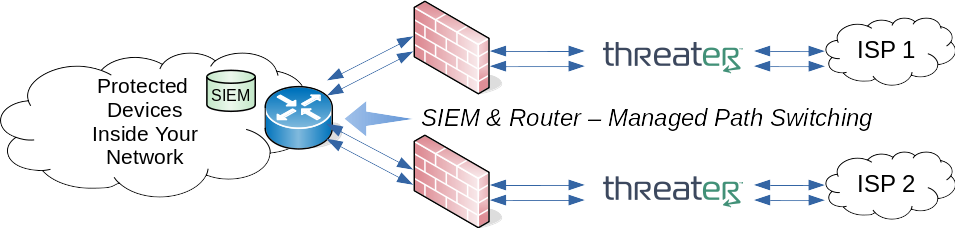
Regardless of a single- or dual-bridge deployment, the SIEM is configured to constantly receive health and related telemetry from the various network and security elements on both the top and the bottom paths. You should consult the documentation for your other inline elements (such as your NGFW) to retrieve appropriate information from those elements. It is recommended to use simple REST API calls to retrieve path information on-demand from the threatER Enforce software for independent status of both the inside and outside ports. A simple linux bash script is provided at the end of this document as an example for retrieving the information in the popular JSON format.
In a typical workflow, if the SIEM detects or correlates a path failure on an active link, the SIEM will reconfigure the managing router to switch the path in Active / Passive scenarios, or disable a path in Active / Active scenarios. Once the previously active path is remediated, it can revert to the original configuration if desired.
Appendix: Example enforceapi Script to Retrieve Port Status Information
In this appendix we provide a SIEM-neutral script that we call enforceapi for our customers to use that can be leveraged out-of-the-box either directly or under the control of other tools (or ported to any architecture that may be needed) for purposes of gathering high-fidelity information critical to responsible failover strategies, leveraging the REST APIs included in our threatER Enforce software.
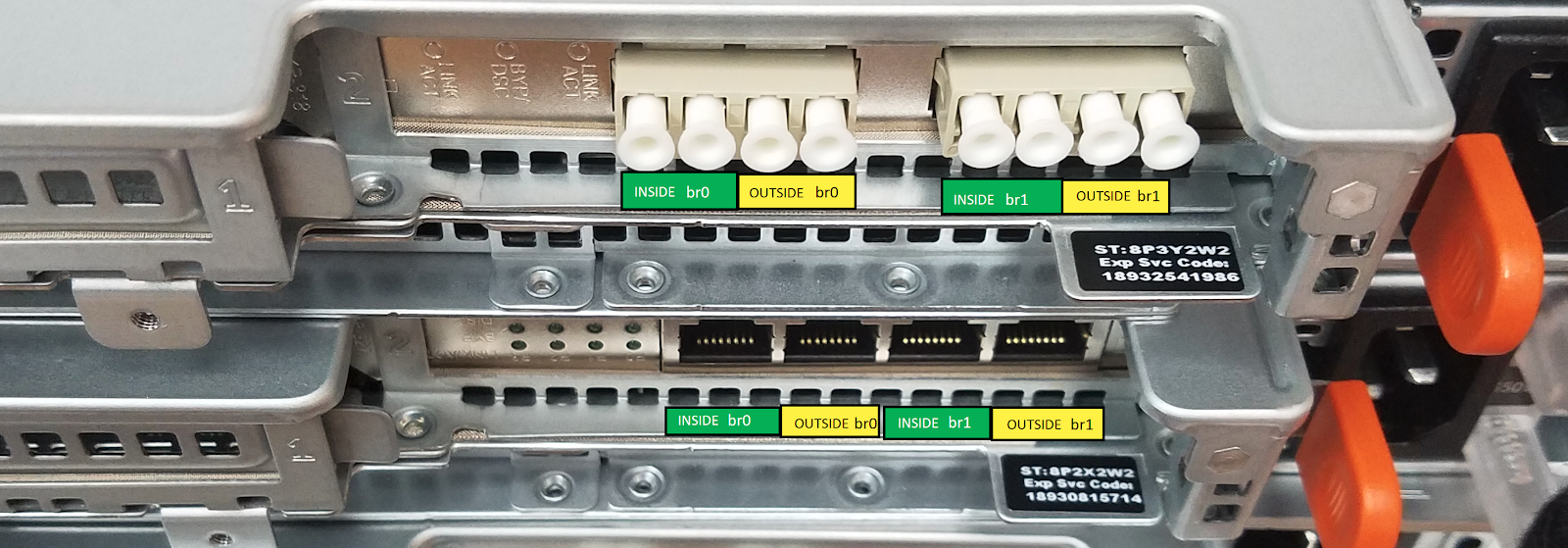
Before we discuss our enforceapi script in detail in this Appendix, it is important to be aware of the bridged pair port and naming conventions for our copper and/or fiber bridging configuration. Generally you’ll find stickers on the unit that identify the ports and port pairs.
Most hardware running threatER Enforce software supports only a single bridge pair br0. In some cases it is also possible to deploy our software on systems with two bridging pairs. A picture of the rear of the copper and fiber variants of one such system is shown below for naming reference:
Our customers are free to use or modify the enforceapi script provided in this appendix to suit their integration needs, such as for integration into their SIEM for high availability management. We’ve tested the script on Ubuntu LTS, but it should work equally well on other Ubuntu Linux variants, and can likely be trivially ported to other Linux distributions by knowledgeable customer staff.
To use the script, you will need to make sure you have the curl and jq tools installed by a user with sufficient privilege on the Linux system that runs the script:
$ sudo apt-get update && sudo apt-get install curl jq
Some advanced SIEMs have the ability to make REST calls natively, so this script may not even be needed. If it is needed, this script can be invoked at any time by the SIEM (or anything else for that matter), according to whatever schedule needed or even in on-demand fashion, to retrieve independent information for both the inside and outside ports leveraging the threatER Enforce software’s built-in REST API, which is the same API leveraged by our local HTTPS UI.
As an aside, if you’re ever wondering what API calls our HTTPS UI makes, it’s trivial to see them in modern browsers, such as by using Mozilla Firefox’s Developer Tools view [F12], or Google Chrome’s DevTools [also F12].
HTTPS is used for all API communications both in our UI and in the provided script. The script assumes you haven’t uploaded a specific SSL certificate to your system and therefore uses the ‘--insecure’ toggle to the curl commands. If you have uploaded a certificate package and/or wish to use it in secure modes (this is generally unnecessary for most localized already-secure deployments), you may need to adjust the curl commands in the script.
When you are ready to run the script, you can see detailed help about the enforceapi tool by invoking enforceapi with no parameters.
Here’s an example on-demand invocation which will use preset variables internal to the script for addressing and authentication, in turn using our API to retrieve all available port information in the popular JSON format from a linux command line on an arbitrary system of your choosing connected to the same network as the administration port:
$ enforceapi pairs
[
{
"name": "br0",
"inside": {
"name": "eth4",
"linkStatus": "Up",
"speed": "1Gb/s",
"duplex": "Full Duplex"
},
"outside": {
"name": "eth5",
"linkStatus": "Up",
"speed": "1Gb/s",
"duplex": "Full Duplex"
}
}
]
The example above was for a single-bridge pair system. The same exact command can be run against a dual-bridge pair system to get results for both of the bridge pairs br0 and br1:
$ enforceapi pairs
[
{
"name": "br0",
"inside": {
"name": "eth5",
"linkStatus": "Up",
"speed": "1Gb/s",
"duplex": "Full Duplex"
},
"outside": {
"name": "eth4",
"linkStatus": "Up",
"speed": "1Gb/s",
"duplex": "Full Duplex"
}
},
{
"name": "br1",
"inside": {
"name": "eth3",
"linkStatus": "Up",
"speed": "1Gb/s",
"duplex": "Full Duplex"
},
"outside": {
"name": "eth2",
"linkStatus": "Up",
"speed": "1Gb/s",
"duplex": "Full Duplex"
}
}
]
Note that the pairs parameter is a shorthand wrapper for our raw API call to endpoint network/bridging.
Notice that both the inside and outside ports show a linkStatus of Up. If either link state changes, such as the outside port, you’d see it report Down. As an example, here’s what you might see on one of our single-pair systems:
$ enforceapi pairs
[
{
"name": "br0",
"inside": {
"name": "eth4",
"linkStatus": "Up",
"speed": "1Gb/s",
"duplex": "Full Duplex"
},
"outside": {
"name": "eth5",
"linkStatus": "Down",
"speed": "0Mb/s",
"duplex": "N/A"
}
}
]
For brevity, we won’t repeat the same example for a dual-pair configuration, but as you might guess, it would report the other pair’s current port status (up or down) in the JSON results, just like the earlier example.
Note that in the example above, the output port reads Down, but the inside port shows Up. This information could be parsed by the SIEM to take appropriate action(s) - and not just with regard to high availability. This is much more beneficial than older methodologies employing simplistic link state propagation. Link state propagation schemes often hide important information about where the problem is, but that information is critical to rapid network remediation. This is especially true when troubleshooting high availability path problems, because when a path is down, you’re typically in a race to get it restored as quickly as possible on the off-chance that the other path fails in the interim. Some network elements of course only support link state propagation and nothing else, which is unfortunate, but in their defense, some systems and their associated software are completely unmanaged and don’t have modern REST-based APIs like we do.
If you really want to “emulate” a link state propagation environment with the API, you can do so using the pathstate parameter, and it will respond with a simple Down or Up response for the pair you select. If both the inside port and outside port associated with the requested pair are Up, it will respond with Up:
$ enforceapi pathstate br0
Up
$ enforceapi pathstate br1
Up
And if either the inside port or the outside port (or both) report Down, the pathstate will return Down for the specified bridge pair. For example, here we see that br1 shows down:
$ enforceapi pathstate br1
Down
Note that the script will return a value of ‘Bypass’ if any pair is found to be in bypass mode. Your SIEM tool would typically need to translate that to either ‘up’ or ‘down’, depending on your business needs. Keep in mind that once in bypass, you must manually switch the pair back into normal mode when ready. A bridge pair that is in bypass means that all traffic flows through via hardware control and no packets can be seen by the threatER Enforce software, meaning no threatER protection exists on bypassed traffic. The bypass mode is meant to be a failsafe to ensure continued traffic flow for hard failures such as a power outage to the hardware upon which the threatER Enforce software is resident, an internal hardware failure (such as a RAM failure, disk failure, motherboard failure, and so on), or catastrophic failure of internal software watchdog techniques (such as a critical software/network process that erroneously stops forwarding all traffic due to perhaps a non-catastrophic hardware failure).
There’s a enforceapi sub-command portinfo that can be used to pull the full JSON information for an individual port pair. For example, on a dual-bridged system, if you want just the full pair information for br1, you can use:
$ enforceapi portinfo br1
{
"name": "br1",
"inside": {
"name": "eth3",
"linkStatus": "Up",
"speed": "1Gb/s",
"duplex": "Full Duplex"
},
"outside": {
"name": "eth2",
"linkStatus": "Up",
"speed": "1Gb/s",
"duplex": "Full Duplex"
}
}
Some final points of interest about the script and its use:
-
You must edit the three CHANGEME values that appear in the script to match the IP address of your target appliance running threatER Enforce software and its associated login credentials. If you don’t wish to embed that information into the script, simply change the three CHANGEME values to something innocuous, like ICHANGEDIT, and use command line parameters to override the settings.
-
The IP address, username, and password credentials can be overridden on command line invocations with the ip, user, and pass sub-commands, respectively. These, however, should be used carefully to avoid prying eyes.
-
Parameter order is important. Some parameters must appear before others. For more details, see the help, by invoking enforceapi with no parameters.
-
We strongly recommend you create a separate user with “read-only” privileges in threatER Enforce for direct API access, so that you can properly monitor API-specific logins and to avoid the potential for accidentally overwriting critical data. Once you have created the read-only user in the UI, you must first log in with that user through the UI (a one-time operation) in order for the new user to be able to access the system and the API.
And last but not least, here’s the source code for the example enforceapi script. You can cut-and-paste it into a file named enforceapi, edit the CHANGEME values, put the tool somewhere in your path, assign the desired permissions (world readable is not recommended if you embed your access credentials), and start using it. Please note the acceptable use and warranty information embedded in the comments at the top of the script.
#!/bin/bash
#
# Copyright 2023, threatER, Inc., All Rights Reserved.
# Revision: 18
#
# This script is for use or modification exclusively by threatER customers with an
# active support subscription. No other use is permitted.
#
# By using and/or modifying this script (THIS PRODUCT), you agree that:
#
# threatER PROVIDES THIS PRODUCT "AS IS". threatER
# MAKES NO WARRANTY, EXPRESS OR IMPLIED, AND HEREBY DISCLAIMS
# ALL IMPLIED WARRANTIES, INCLUDING ANY WARRANTY OF
# MERCHANTABILITY AND WARRANTY OF FITNESS FOR A PARTICULAR PURPOSE.
#
# The script's purpose is to invoke direct API calls to/from a threatER Enforce software installation
# using curl commands alongside simple parsing with jq.
#
# This script is written in bash. It has been tested running from an arbitrary Ubuntu 18.04 LTS or
# Ubuntu 20.04 LTS linux system with the 'netcat', 'curl' and 'jq' packages installed, but other
# Ubuntu LTS variants should run this equally well.
#
# If you need to install curl and jq on your host system, you can do so with sudo privileges as follows:
#
# $ sudo apt-get update && sudo apt-get install curl jq netcat
#
# To see the simple help information associated with this script, run this script with no parameters,
# or with a parameter of 'help'.
# You should really change the three script variables below 'productDefaultIp', 'productDefaultUser', and 'productDefaultPass'
# from "CHANGEME" to something else, or if you leave them with these default nonsensical values, be sure to
# use the provided command line parameters as documented in the help to adjust them for your environment.
#
productDefaultIp=CHANGEME
productDefaultUser=CHANGEME
productDefaultPass=CHANGEME
# general variables - do not change these
progInvoked=$0
progBase=$(echo $0 | rev | cut -d '/' -f1 | rev)
tmpFileLeaderBase="eapi"
tmpFileLeader="/tmp/$tmpFileLeaderBase"
ofile=$tmpFileLeader.txt
# output color codes of interest
RED='\033[1;31m'
YELLOW='\033[1;33m'
NC='\033[0m'
# output control function - central location for quiet/verbose checks
function funcOutputMsg {
if [ "$quiet" == "false" ]
then
echo -e "$1"
fi
}
# primary error message handling - always displays regardless of quiet mode, and always in red
function funcErrorMsg {
echo -e "${RED}$1${NC}"
}
# error processing - curl
function funcErrorExitCurl {
funcErrorMsg "\nERROR:\n$(cat ${tmpFileLeader}err.txt)"
exit 1
}
# error processing - general
function funcErrorExitGeneral {
funcErrorMsg "\nERROR: $1"
exit 1
}
# help
function funcShowHelpAndExit {
# clear global quiet flag
quiet=false
# counsel user if they haven't updated the CHANGEME defaults yet
grep "^productDefaultIp=CHANGEME" $progInvoked &>/dev/null
local locChangeMe1=$?
grep "^productDefaultUser=CHANGEME" $progInvoked &>/dev/null
local locChangeMe2=$?
grep "^productDefaultPass=CHANGEME" $progInvoked &>/dev/null
local locChangeMe3=$?
local locErrMsg=
if [[ "$locChangeMe1" == "0" || "$locChangeMe2" == "0" || "$locChangeMe3" == "0" ]]
then
locErrMsg="You haven't yet changed the CHANGEME quantities in this script for the IP address, username and password. Be sure you either change them in the script with a text editor of your choice, or use the available command line parameters to override them. Exiting."
fi
# if we didn't construct the error message above, see if anything specific was passed in for use
if [[ "$locErrMsg" == "" && "$1" != "" ]]
then
locErrMsg="$1"
fi
funcOutputMsg ""
funcOutputMsg "Copyright 2023, threatER, Inc., All Rights Reserved. The comments at the top of the source code for this script contain relevant acceptable use and warranty information. You can view this information using a text viewer/editor of your choice."
funcOutputMsg ""
funcOutputMsg "Usage: $0 [verbose] [ip [address]] [user [username]] [pass [password]] [ help | pairs | pathstate [br0|br1] | portinfo [br0|br1] | raw [direct API call] ]"
funcOutputMsg ""
funcOutputMsg " bypass : shows relevant bypass information for all avaialble pairs."
funcOutputMsg ""
funcOutputMsg " help : displays this help"
funcOutputMsg ""
funcOutputMsg " ip [address] : optional; overrides the default target IP address used by the script."
funcOutputMsg ""
# undocumented: nologout
# funcOutputMsg " nologout : keeps the session active after running instead of logging out. Useful for manual follow-up commands; as a best practice, be sure to logout manually when you're done. And last but not least, you should only use this option if you are familiar with manual logout procedures."
# funcOutputMsg ""
funcOutputMsg " pairs : shorthand for 'raw network/bridging'"
funcOutputMsg ""
funcOutputMsg " pass [password] : optional; overrides the default password used by the script. However, you should use this override cautiously, ensuring that no one can see what you type or see your screen. It is much safer to embed the password in this script and ensure that only appropriately privileged users have access to the script for read/write/execute permissions."
funcOutputMsg ""
funcOutputMsg " pathstate [br0|br1] : shows either 'Up' or 'Down' depending on the path state of the requested bridged pair. If you specify br1 on a system that doesn't support dual bridging, no results will generally be returned (except for any verbose information requested). Note: this emulates a link state propagation if such legacy techniques are needed."
funcOutputMsg ""
funcOutputMsg " portinfo [br0|br1] : shows the raw JSON output for the specified bridged pair. If you specify br1 on a system that doesn't support dual bridging, no results will generally be returned (except for any verbose information requested)."
funcOutputMsg ""
funcOutputMsg " raw [direct API call] : the raw JSON results are returned for a direct API v1 call via a standard GET operation. Leading 'api/v1/' is assumed unless a different leader is supplied. An example raw script invocation might be '$0 raw network/bridging' which would return the raw JSON port information for both the inside and outside ports of all bridging pairs. Another example is '$0 raw bypass' which will return information about bypass status, if applicable."
funcOutputMsg ""
funcOutputMsg " rawpatch [direct API call] [JSON file to PATCH] : the raw JSON results are returned for a direct API v1 call via a standard PATCH operation for a specified JSON data file. Leading 'api/v1/' is assumed unless a different leader is supplied."
funcOutputMsg ""
funcOutputMsg " rawpost [direct API call] : the raw JSON results are returned for a direct API v1 call via a standard POST operation. Leading 'api/v1/' is assumed unless a different leader is supplied. An example would be to use an invocation '$0 rawpost system/reboot' which would invoke the reboot endpoint via POST operation to attempt to reboot the target system. (Note: that has the same effect as the standalone 'reboot' parameter to this script.)"
funcOutputMsg ""
funcOutputMsg " rawput [direct API call] [JSON file to PUT] : the raw JSON results are returned for a direct API v1 call via a standard PUT operation for a specified JSON data file. Leading 'api/v1/' is assumed unless a different leader is supplied."
funcOutputMsg ""
funcOutputMsg " reboot : uses a POST API call to attempt to reboot the target system."
funcOutputMsg ""
funcOutputMsg " user [username] : optional; overrides the default username used by the script."
funcOutputMsg ""
funcOutputMsg " verbose : displays detailed script information as it happens. Useful for debugging. Generally, you won't want to use 'verbose' in a production scenario in order to declutter the output for results parsing in your SIEM. If used, 'verbose' should be the first parameter, otherwise undefined behavior may result."
funcOutputMsg ""
if [ "$locErrMsg" != "" ]
then
funcOutputMsg ""
funcOutputMsg "${RED}$locErrMsg${NC}"
funcOutputMsg ""
funcOutputMsg "Current target default config:"
funcOutputMsg " IP: $productDefaultIp"
funcOutputMsg " user: $productDefaultUser"
funcOutputMsg ""
fi
exit 0
}
# logout
function funcLogoutExit {
if [ "$maintainSession" != "true" ]
then
funcOutputMsg "\nLogging out ..."
curl --insecure -H "Accept: application/json" -H "Authorization: Bearer $authBearer" -X POST "https://$productIp/api/v1/auth/logout" &>${tmpFileLeader}err.txt
if [ "$?" == "0" ]
then
funcOutputMsg "Logged out"
fi
else
funcOutputMsg "\nMaintaining session and not logging out due to command line invocation parameter ..."
fi
# remove temp files
rm -f /tmp/${tmpFileLeaderBase}*.txt
rm -f /tmp/${tmpFileLeaderBase}*.json
exit 0
}
# makes a GET API call via curl
function funcApiCall {
local locUseLeader=api/v1/
if [ "${1:0:5}" == "api/v" ]
then
locUseLeader=
fi
rm -f $ofile
rm -f ${tmpFileLeader}err.txt
funcOutputMsg "curl: curl --output $ofile --insecure --silent -G \"https://$productIp/$locUseLeader$1\" -H \"Authorization: Bearer $authBearer\" 2>${tmpFileLeader}err.txt"
curl --output $ofile --insecure --silent -G "https://$productIp/$locUseLeader$1" -H "Authorization: Bearer $authBearer" 2>${tmpFileLeader}err.txt
if [ "$?" != "0" ]
then
funcErrorExitCurl
fi
}
# makes a PATCH API call via curl
function funcApiPatchCall {
local locUseLeader=api/v1/
if [ "${1:0:5}" == "api/v" ]
then
locUseLeader=
fi
rm -f $ofile
rm -f ${tmpFileLeader}err.txt
local locCmd="curl --output $ofile --insecure --silent -X PATCH 'https://$productIp/$locUseLeader$1' -d '$(cat $jsonFile)' -H 'Authorization: Bearer $authBearer' 2>${tmpFileLeader}err.txt"
funcOutputMsg "curl: $locCmd"
bash -c "$locCmd"
if [ "$?" != "0" ]
then
funcErrorExitCurl
fi
}
# makes a POST API call via curl
function funcApiPostCall {
local locUseLeader=api/v1/
if [ "${1:0:5}" == "api/v" ]
then
locUseLeader=
fi
rm -f $ofile
rm -f ${tmpFileLeader}err.txt
curl --output $ofile --insecure --silent -X POST "https://$productIp/$locUseLeader$1" -H "Authorization: Bearer $authBearer" 2>${tmpFileLeader}err.txt
if [ "$?" != "0" ]
then
funcErrorExitCurl
fi
}
# makes a PUT API call via curl
function funcApiPutCall {
local locUseLeader=api/v1/
if [ "${1:0:5}" == "api/v" ]
then
locUseLeader=
fi
rm -f $ofile
rm -f ${tmpFileLeader}err.txt
local locCmd="curl --output $ofile --insecure --silent -X PUT 'https://$productIp/$locUseLeader$1' -d '$(cat $jsonFile)' -H 'Authorization: Bearer $authBearer' 2>${tmpFileLeader}err.txt"
funcOutputMsg "curl: $locCmd"
bash -c "$locCmd"
if [ "$?" != "0" ]
then
funcErrorExitCurl
fi
}
# handles path state determination for a specified pair
function funcPathStateForPair {
funcOutputMsg "\nInvoking pathstate operation ..."
# first determine if bypass is set for the pair
funcApiCall bypass
cat $ofile | jq ".[] | select ( .name | contains(\"$1\") )" > ${tmpFileLeader}path.txt
# if matching pair not found, it doesn't exist, so leave doing nothing
if [ ! -s ${tmpFileLeader}path.txt ]
then
funcOutputMsg "${YELLOW}Warning: requested bridge pair $1 was not found on the target system.${NC}"
return
fi
# finish bypass determination - if it shows bypass, we state that and leave
cat ${tmpFileLeader}path.txt | grep currentState | grep normal &>/dev/null
if [ "$?" != "0" ]
then
echo "Bypass"
funcLogoutExit
fi
# if here, it isn't in bypass, so the path must be either up or down - figure it out!
funcApiCall network/bridging
cat $ofile | jq . | grep "Down" &>/dev/null
cat $ofile | jq ".[] | select ( .name | contains(\"$1\") )" | grep "Down" &>/dev/null
if [ "$?" == "0" ]
then
echo "Down"
else
echo "Up"
fi
}
# handles portinfo for a specified pair
function funcPortInfoForPair {
funcOutputMsg "\nInvoking portinfo operation ..."
# identify the pair first determine if bypass is set for the pair
funcApiCall network/bridging
cat $ofile | jq ".[] | select ( .name | contains(\"$1\") )" >${tmpFileLeader}port.txt
# if matching pair not found, it doesn't exist, so leave doing nothing
if [ ! -s ${tmpFileLeader}port.txt ]
then
funcOutputMsg "${YELLOW}Warning: requested bridge pair $1 was not found on the target system.${NC}"
return
fi
# if here, data was valid, so display it
cat ${tmpFileLeader}port.txt | jq .
}
# handles target reboot request
function funcTargetReboot {
funcOutputMsg "\nAttempting to reboot target IP: $productIp ..."
funcApiPostCall system/reboot
cat $ofile | jq .
}
# setup/process parameters
quiet=true
pathState=false
portInfo=false
inBypass=false
valid=false
productIp=$productDefaultIp
productUser=$productDefaultUser
productPass=$productDefaultPass
endpointParm=
rawEndpoint=
endpoint=
maintainSession=false
while [ $# -ne 0 ]
do
arg="$1"
case "$arg" in
bypass)
funcOutputMsg "Option: bypass"
if [[ "$endpoint" != "" || "$endpointParm" != "" ]]
then
funcErrorExitGeneral "Invalid parameters. Only one endpoint-related parameter can be provided for each invocation. Exiting."
fi
rawEndpoint=GET
endpoint=bypass
valid=true
shift
;;
verbose)
quiet=false
funcOutputMsg "Option: verbose"
# we don't set valid on verbose sub-commands; this is just a decorator
shift
;;
help)
funcOutputMsg "Option: help"
funcShowHelpAndExit
valid=true
shift
;;
ip)
funcOutputMsg "Option: ip"
productIp=$2
if [ "$productIp" == "" ]
then
funcErrorExitGeneral "Invalid parameters. The 'ip' option requires a sub-parameter specifying a numeric IP address or resolvable hostname."
fi
# we don't set valid on ip sub-commands; this is just a decorator
shift
shift
;;
nologout)
maintainSession=true
shift
;;
pairs)
funcOutputMsg "Option: pairs"
if [[ "$endpoint" != "" || "$endpointParm" != "" ]]
then
funcErrorExitGeneral "Invalid parameters. Only one endpoint-related parameter can be provided for each invocation. Exiting."
fi
rawEndpoint=GET
endpoint=network/bridging
valid=true
shift
;;
pass)
funcOutputMsg "Option: pass"
productPass=$2
if [ "$productPass" == "" ]
then
funcErrorExitGeneral "Invalid parameters. The 'pass' option requires a sub-parameter specifying the password to use."
fi
# we don't set valid on pass sub-commands; this is just a decorator
shift
shift
;;
pathstate)
funcOutputMsg "Option: pathstate"
if [[ "$endpoint" != "" || "$endpointParm" != "" ]]
then
funcErrorExitGeneral "Invalid parameters. Only one endpoint-related parameter can be provided for each invocation. Exiting."
fi
endpointParm=true
pathState=true
pair=$2
if [[ "$pair" != "br0" && "$pair" != "br1" ]]
then
funcErrorExitGeneral "Invalid pair. The 'pathstate' option requires a sub-parameter of 'br0' or 'br1'."
fi
valid=true
shift
shift
;;
portinfo)
funcOutputMsg "Option: portinfo"
if [[ "$endpoint" != "" || "$endpointParm" != "" ]]
then
funcErrorExitGeneral "Invalid parameters. Only one endpoint-related parameter can be provided for each invocation. Exiting."
fi
endpointParm=true
portInfo=true
pair=$2
if [[ "$pair" != "br0" && "$pair" != "br1" ]]
then
funcErrorExitGeneral "Invalid pair. The 'portinfo' option requires a sub-parameter of 'br0' or 'br1'."
fi
valid=true
shift
shift
;;
raw)
funcOutputMsg "Option: raw"
if [[ "$endpoint" != "" || "$endpointParm" != "" ]]
then
funcErrorExitGeneral "Invalid parameters. Only one endpoint-related parameter can be provided for each invocation. Exiting."
fi
rawEndpoint=GET
endpoint=$2
if [ "$endpoint" == "" ]
then
funcShowHelpAndExit "Error: the 'raw' option requires a sub-parameter specifying the API endpoint."
fi
valid=true
shift
shift
;;
rawpatch)
funcOutputMsg "Option: rawpatch"
if [[ "$endpoint" != "" || "$endpointParm" != "" ]]
then
funcErrorExitGeneral "\nInvalid parameters. Only one endpoint-related parameter can be provided for each invocation. Exiting."
fi
rawEndpoint=PATCH
endpoint="$2"
if [ "$endpoint" == "" ]
then
funcShowHelpAndExit "Error: the 'rawpatch' option requires a sub-parameter specifying the API endpoint."
fi
jsonFile="$3"
if [ "$jsonFile" == "" ]
then
funcShowHelpAndExit "Error: the 'rawpatch' option requires a second sub-parameter specifying the JSON file to PATCH."
fi
valid=true
shift
shift
shift
;;
rawpost)
funcOutputMsg "Option: rawpost"
if [[ "$endpoint" != "" || "$endpointParm" != "" ]]
then
funcErrorExitGeneral "\nInvalid parameters. Only one endpoint-related parameter can be provided for each invocation. Exiting."
fi
rawEndpoint=POST
endpoint=$2
if [ "$endpoint" == "" ]
then
funcShowHelpAndExit "Error: the 'rawpost' option requires a sub-parameter specifying the API endpoint."
fi
valid=true
shift
shift
;;
rawput)
funcOutputMsg "Option: rawput"
if [[ "$endpoint" != "" || "$endpointParm" != "" ]]
then
funcErrorExitGeneral "\nInvalid parameters. Only one endpoint-related parameter can be provided for each invocation. Exiting."
fi
rawEndpoint=PUT
endpoint="$2"
if [ "$endpoint" == "" ]
then
funcShowHelpAndExit "Error: the 'rawput' option requires a sub-parameter specifying the API endpoint."
fi
jsonFile="$3"
if [ "$jsonFile" == "" ]
then
funcShowHelpAndExit "Error: the 'rawput' option requires a second sub-parameter specifying the JSON file to PUT."
fi
valid=true
shift
shift
shift
;;
reboot)
funcOutputMsg "Option: reboot"
if [[ "$endpoint" != "" || "$endpointParm" != "" ]]
then
funcErrorExitGeneral "\nInvalid parameters. Only one endpoint-related parameter can be provided for each invocation. Exiting."
fi
endpointParm=true
doReboot=true
valid=true
shift
;;
user)
funcOutputMsg "Option: user"
productUser=$2
if [ "$productUser" == "" ]
then
funcErrorExitGeneral "\nInvalid parameters. The 'user' option requires a sub-parameter specifying the password to use."
fi
# we don't set valid on user sub-commands; this is just a decorator
shift
shift
;;
*)
funcShowHelpAndExit "Unknown parameter ($progbase): '$arg'. Exiting."
;;
esac
done
# validity checking
if [ "$valid" != "true" ]
then
funcShowHelpAndExit "Error: no endpoint or endpoint-related parameter was specified. Exiting."
fi
# verify curl is installed and reachable
if [ "$(which curl)" == "" ]
then
funcErrorExitGeneral "'curl' was not found on this system. Please have your system administrator install it and all other dependencies required by this script by using: 'sudo apt-get update && sudo apt-get install curl jq netcat'. Exiting."
fi
# verify curl is installed and reachable
if [ "$(which jq)" == "" ]
then
funcErrorExitGeneral "'jq' was not found on this system. Please have your system administrator install it and all other dependencies required by this script by using: 'sudo apt-get update && sudo apt-get install curl jq netcat'. Exiting."
fi
# verify nc is installed and reachable
if [ "$(which nc)" == "" ]
then
funcErrorExitGeneral "'nc' (also known as 'netcat') was not found on this system. Please have your system administrator install it and all other dependencies required by this script by using: 'sudo apt-get update && sudo apt-get install curl jq netcat'. Exiting."
fi
# verify can see the target system
nc -vzw 2 $productIp 443 &>/dev/null
if [ "$?" != "0" ]
then
funcErrorExitGeneral "Could not see port 443 on IP '$productIp'. Double check that you can connect to that IP from your host system and make sure it is powered on and operational. A good check of the latter is to make sure you can hit the web UI from a browser of your choice. Exiting."
fi
# login and get auth bearer (note: we always use the /api/v1 call for auth login)
rm -f ${tmpFileLeader}err.txt
funcOutputMsg "\nLogging in to get an authorization bearer token ..."
curl --silent -H "Content-Type: application/json" -d "{\"username\":\"$productUser\",\"password\":\"$productPass\",\"agree\":\"false\"}" --insecure -X POST "https://$productIp/api/v1/auth/login" > ${tmpFileLeader}auth.json 2>${tmpFileLeader}err.txt
if [ "$?" != "0" ]
then
funcErrorExitGeneral "Authentication failed. Please update your credentials and try again."
fi
grep "invalid user" ${tmpFileLeader}auth.json &>/dev/null
if [ "$?" == "0" ]
then
funcErrorExitGeneral "Authentication failed. Your credentials were invalid. Please check your credentials and update them as appropriate. See 'help' for command line parameter information."
fi
authBearer="$(cat ${tmpFileLeader}auth.json | cut -d ':' -f2 | cut -d ',' -f 1 | cut -d '"' -f2)"
if [ "$authBearer" == "" ]
then
funcErrorExitGeneral "Authentication failed. Please update your credentials and try again."
fi
funcOutputMsg "Logged in successfully."
# handle reboot
if [ "$doReboot" == "true" ]
then
funcTargetReboot
# handle pathstate
elif [ "$pathState" == "true" ]
then
funcPathStateForPair $pair
# handle portinfo
elif [ "$portInfo" == "true" ]
then
funcPortInfoForPair $pair
# otherwise we must be a raw API call
elif [ "$endpoint" != "" ]
then
# handle standard API call
funcOutputMsg "\nMaking API call using a '$rawEndpoint' invocation: $endpoint ..."
if [ "$rawEndpoint" == "GET" ]
then
funcApiCall $endpoint
elif [ "$rawEndpoint" == "POST" ]
then
funcApiPostCall $endpoint
elif [ "$rawEndpoint" == "PATCH" ]
then
funcApiPatchCall $endpoint "$jsonFile"
else
funcApiPutCall $endpoint "$jsonFile"
fi
funcOutputMsg "API call complete."
# API call results
funcOutputMsg "\nJSON Results (if applicable):\n"
cat $ofile | jq .
else
# technically we shouldn't get here due to previous validations, but use this as a stopgap just in case
funcShowHelpAndExit "Error: no endpoint or endpoint-related parameter was specified. Exiting."
fi
# we're all done; cleanup by properly logging out
funcLogoutExit