
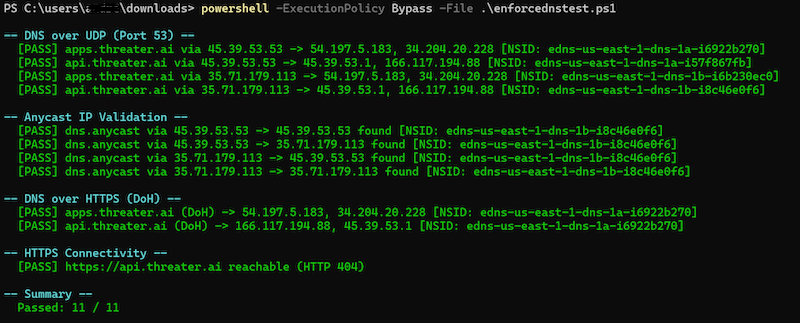
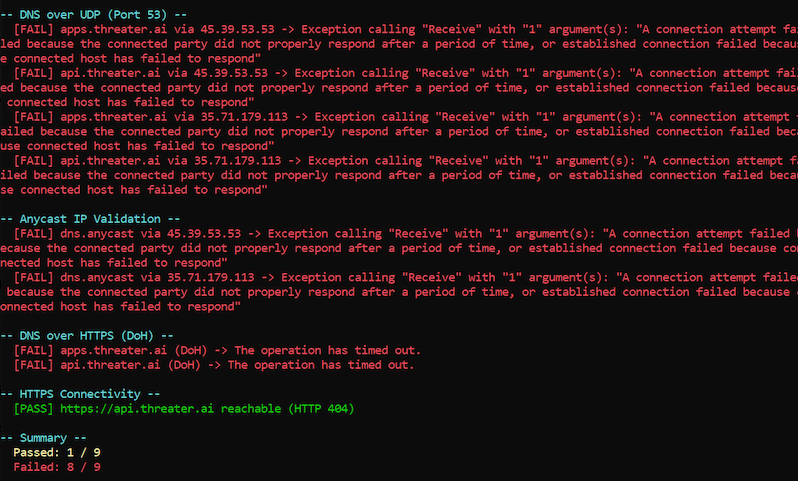
For Windows users, the fastest way to test whether you can communicate with the EnforceDNS infrastructure is to run the Powershell Script. The purpose of this script is to ensure that your environment can resolve threatER’s Anycast DNS addresses and establish secure HTTPS connections to our APIs.
What the Script Does
The script performs four main checks to validate your network's compatibility with EnforceDNS:
-
DNS over UDP (Port 53): It sends standard DNS queries to EnforceDNS’s primary resolvers (
45.39.53.53and35.71.179.113) to ensure traditional DNS traffic is not being blocked by local firewalls. -
Anycast Validation: It verifies that the IP addresses returned are the correct ones.
-
DNS over HTTPS (DoH): It tests whether your network allows secure DNS queries over HTTPS (Port 443).
-
API Gateway Connectivity: It performs a standard HTTPS "heartbeat" check to
api.threater.aito confirm the connection.
Connectivity Results
Security & Privacy FAQs
-
No Administrative Privileges Required: The script can be run by a standard user; it does not require "Run as Administrator."
-
No Changes Made: The script does not modify registry keys, change DNS settings, install certificates, or alter firewall rules.
-
Encrypted Communication: All HTTPS tests utilize TLS 1.2 or TLS 1.3, matching modern security standards.
-
Transparent Results: All findings are printed directly to the PowerShell console window for immediate review.