Breadcrumbs

macOS Agent Troubleshooting

The Agent currently uses branding for HYAS Protect, including the app icon in the Menu Bar. This will be updated in a future release.

Before performing any troubleshooting steps, please be sure you have the latest version of the Agent.

Updating the Agent

Checking the Version of the EnforceDNS Agent
  1. Navigate to the EnforceDNS Portal> Settings (gear icon)> Organization Settings> EnforceDNS Agent

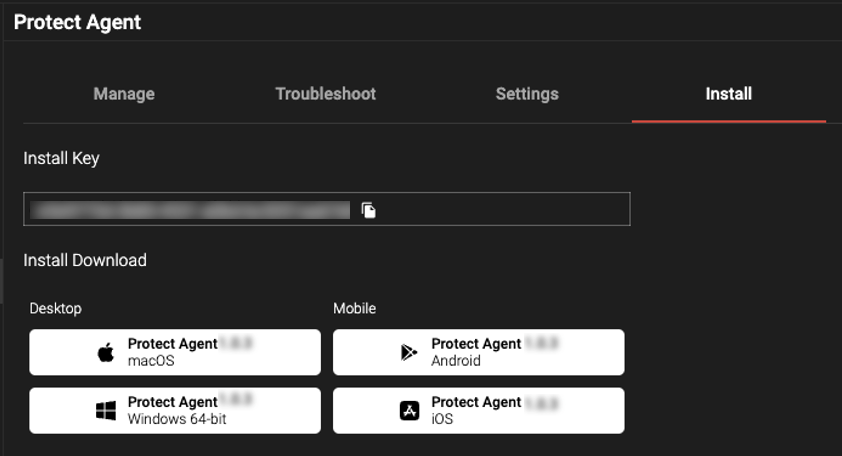
    1. From the Install screen, you’ll see the Install Download buttons. These buttons have the latest release number on them. Note the release number for the macOS Agent here.


Screenshot 2024-05-28 at 5.00.28 PM.png


  1. Now determine which version is on the specified machine.

Method 1:

  • Navigate to the Manage section of the EnforceDNS Agent Portal.

    • Find the device name, then look under the Agent Version column to see the associated version.

Method 2:

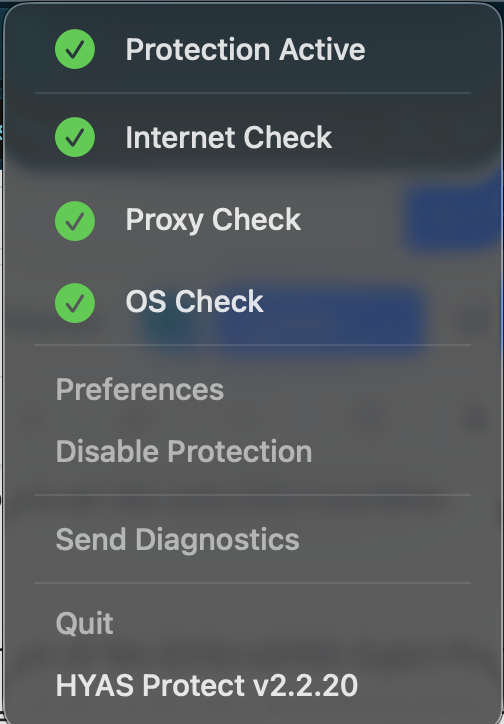
  • On the local machine, click on the HYAS icon in the Menu Bar to see the version number, which can be found at the bottom of the Agent UI.

AgentUI-macOS-Version.png
Determining the Agent version using the Agent UI
  • If you Agent version is outdated, update the Agent (see below).

How to Update the EnforceDNS Agent
  1. In the EnforceDNS Portal, choose EnforceDNS Agent and go to Manage

  2. Select the device you wish to update

  3. Click Actions (the three dots)

  4. Click Update Agent

Please allow up to 15 minutes for the update to complete. The machine must be currently running in order to perform an update. If not, the update will take place the next time the Agent is running.

Captive Portal Connectivity

Handling Captive Portal Connectivity Issues

When connecting to the Internet via a hotel, coffee shop, or related location, often the store or location utilizes a “captive portal” that the device must connect to prior to obtaining full Internet access. In some cases, the device may not properly connect to the captive portal, meaning that the device may not properly authenticate to obtain access to the Internet.

First, the user should perform a restart of their device. A device reboot should resolve the issue.

If a reboot does not resolve the issue, and the device still cannot connect to the captive portal, you need to stop the EnforceDNS service (please note the user will need admin privileges to perform some of these options).

The device should now be able to connect to the captive portal and thus the internet. If the captive portal does not appear, consider disconnecting from the network and reconnect to prompt the captive portal to appear, or reboot the machine again.

When network access has been restored, restart the EnforceDNS service either through the Agent UI, the EnforceDNS Portal, or a Terminal script.

If the above suggestions are ineffective and immediate access to the network is required, the Agent may be disabled via the following procedure:

  • Connect temporarily to another network such as personal cellular hotspot

    • Coordinate with IT to allow an admin to remotely access the machine

    • Admin runs a disable script provided by threatER

    • When the Agent has been disabled, disconnect from the hotspot or other network

    • Reconnect to the network with the captive portal (may require machine reboot)

Local Domains Not Resolving

Unable to Resolve Local Domains

Corporate networks, often referred to as a corporate or company Intranet, typically use local domains (DNS suffixes) for local resources. If a problem with the resolution of local domains occurs:

  • Ensure all local domains associated with the organization are configured in the Local Domains tab in the EnforceDNS Portal.

    • This can be found under Settings (gear icon)> Organization Settings> EnforceDNS Agent> Settings

  • If a local domain is not configured, then endpoints will not be able to resolve resources associated with that domain. 

  • Configure any internal resolver IP in the EnforceDNS Portal that is expecting an endpoint to query for DNS records. This should be completed prior to the agent installation to prevent possible resolution issues and negative user experience.

Split-Horizon DNS Functionality

Configuring Split-Horizon DNS

In some cases, organizations use of the same domain both on the local intranet and on the internet. This dual usage creates ambiguity in resolving the domain's IP address, as it may resolve to private IP addresses when connected to the intranet and to public IP addresses when outside the office.

To solve for this, the Agent can use Split-Horizon DNS (also known as Split-Brain). This test is specifically designed for environments where internal and external users receive different DNS responses for the same domain. The system sends a DNS query to your designated local resolver and compares the response to an expected local IP address.

  • If the response matches: The system confirms that the device is on your local network and applies the corresponding local settings.

  • If there’s no match: The system assumes the device is on an external network and applies external settings.

The EnforceDNS Portal allows you to configure Split-Horizon. For more information, see Split-Horizon DNS & Local Resolution Settings.

Additional Troubleshooting Scripts for Terminal

Note that Administrator privileges are needed in order to run the below scripts.

View Local Log of the Agent
Bash
sudo tail -f /var/log/com.hyas.protect/dnsproxy.log
Uninstall the Agent
Bash
sudo bash /Library/Application\ Support/com.hyas.protect/uninstall.sh
rm /tmp/.hyas.protect.client.id
Check Running State of the Agent
Bash
ps -ef | grep com.hyas.protect.dnsproxy | grep -v grep
sudo launchctl list | grep hyas
ps -ef | grep "EnforceDNS.app" | grep -v grep
Restart the Service/Agent
Bash
sudo launchctl unload /Library/LaunchDaemons/com.hyas.protect.plist
sleep 3
sudo launchctl load /Library/LaunchDaemons/com.hyas.protect.plist
Stop the Service/Agent
sudo launchctl unload /Library/LaunchDaemons/com.hyas.protect.plist
Start the Service/Agent
Bash
sudo launchctl load /Library/LaunchDaemons/com.hyas.protect.plist

Missing Devices

Missing Devices in Logs or in the EnforceDNS Portal

If you’ve installed the Agent using a golden image and some machines appear to be “missing” from the logs or the EnforceDNS Agent> Manage tab, the issue may be due to the image being incorrectly configured. An improperly set up golden image can duplicate the machine ID across all deployed devices, causing log discrepancies and making it appear as though machines are missing. In some cases, affected devices may briefly appear in the Manage tab before disappearing. To avoid this, configure the golden image to generate a unique machine ID on each device after deployment.

Connectivity Issues

Agent Fails One or More Connectivity Checks

If you’re running into any connection issues with the Agent, go to EnforceDNS Agent Configuration to see requirements for Agent connectivity.